White-label WordPress maintenance lets your agency sell monthly website care under its own brand, while a specialist partner does the technical work behind the scenes. Your clients get updates, backups, security monitoring and fast fixes. You get recurring revenue, without hiring a developer or answering support tickets at midnight.
This guide is for design, SEO and digital marketing agencies weighing that move. It covers how white-label maintenance works day to day, what a good plan includes, what to demand from a partner, the red flags to avoid, and how the numbers work.
It draws on what we’ve learned at WP Small Fix since 2017, resolving more than 10,000 WordPress issues for businesses and agencies in over 40 countries.
In short
- White-label maintenance means a partner maintains your clients’ WordPress sites; you sell it under your brand and set the price.
- A solid plan covers updates, off-site backups, security, uptime monitoring, fixes and a monthly report.
- The partner matters more than the price. Ask who does the work, how fast they respond, and how they keep your clients’ data confidential.
- Done well, it turns one-off website projects into predictable monthly income, and protects clients at a time when 91% of new WordPress vulnerabilities are found in plugins.
Contents
What Is White-Label WordPress Maintenance?
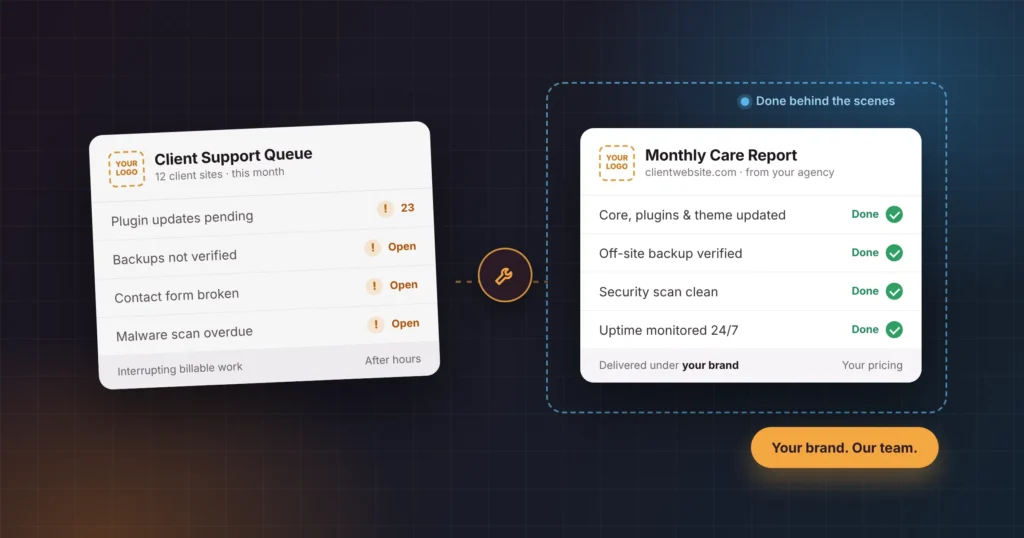
White-label WordPress maintenance is an arrangement in which a specialist team keeps an agency’s client websites updated, secure, backed up and working, and the agency sells that service to its clients under its own brand. The client deals only with the agency. The maintenance partner stays invisible.
In practice, a white-label maintenance service usually covers:
- WordPress core, plugin and theme updates, tested before and after
- Automated off-site backups and restore when needed
- Security monitoring, malware scanning and clean-up
- Uptime monitoring with alerts
- Speed and performance checks
- Small fixes and content changes within an agreed monthly allowance
- A monthly report you can pass to your client
It sits between doing everything in-house and sending clients elsewhere. You keep the relationship and the margin, while someone else carries the technical load.
Why Do Agencies Outsource WordPress Maintenance?
Agencies outsource WordPress maintenance to protect their margins, add recurring revenue, cover skills and hours they don’t have in-house, and reduce the risk of client sites being hacked or broken. The work is constant and technical, but it’s rarely the reason clients hire an agency in the first place.
Most agencies don’t set out to run a support desk. It happens gradually: a client asks for “one small change”, a plugin update breaks a contact form, and suddenly a designer is debugging PHP on a Friday night. Here’s why more agencies are handing that work to a white-label partner.
It protects your margin
Unplanned support work is the most expensive work an agency does, because it interrupts billable projects. A white-label partner turns that unpredictable cost into a fixed, known cost per site.
It creates recurring revenue
Project income arrives in lumps. Maintenance arrives every month. Ten or twenty clients on a care plan give you a predictable revenue floor, which makes hiring, cash flow and planning far easier. If you’re building your plans from scratch, our guide on how to build and sell WordPress care plans walks through tiers and positioning.
It covers skills you don’t have in-house
Modern WordPress sites rely on page builders, WooCommerce, payment gateways, caching layers and dozens of plugins. A dedicated maintenance team sees the same problems across hundreds of sites, so it fixes them faster than a generalist can. Similarly, SEO agencies use the same model to ship audit fixes when technical recommendations stall because their team lacks developer bandwidth.
It covers the hours you don’t work
Websites break outside office hours. A partner with teams in several time zones can respond while your team is asleep, so your clients notice a fix rather than an outage.
It reduces risk
Most WordPress security problems start in plugins, not in WordPress itself. Patchstack’s State of WordPress Security in 2026 report counted 11,334 new vulnerabilities across the WordPress ecosystem in 2025, 42% more than in 2024, and 91% of them were in plugins. Its tests also found that typical hosting defenses blocked only 12% to 26% of attacks on WordPress-specific vulnerabilities. Regular, tested updates and real off-site backups are the cheapest protection an agency can offer its clients.
What Are the Pros and Cons of White-Label WordPress Maintenance?
The main advantages are recurring revenue, lower cost than hiring and wider technical cover. The main drawbacks are less direct control and dependence on one partner. Most of the drawbacks can be managed with a written agreement and the right partner.
| Pros | Cons, and how to manage them |
| Predictable monthly revenue from every client site | Less direct control over the work. Agree response times and testing rules in writing. |
| No salary, recruitment or training costs | You depend on one partner. Keep admin access and backups you can reach yourself. |
| Cover for evenings, weekends and holidays | Quality varies between providers. Start with a small batch of sites before moving everyone. |
| Access to WooCommerce, speed and security skills | Client data passes to a third party. Use an NDA and share access through temporary accounts. |
| Your team stays focused on design, SEO or marketing | Margins shrink if you underprice. Set retail prices before you sign. |
White-Label Partner vs In-House Developer vs Freelancer
For most agencies managing more than a handful of client WordPress sites, a white-label partner costs less than an in-house developer and is more dependable than a single freelancer. An in-house hire makes sense once maintenance and development work can keep one person busy full time.
| White-label partner | In-house developer | Freelancer | |
| Cost | Per site or per task, scales with clients | Fixed salary and overheads | Hourly, varies |
| Availability | A team, often across time zones | Office hours, one person | Depends on their other clients |
| Cover for holidays and sick days | Built in | None | None |
| Range of skills | Updates, security, WooCommerce, speed, migrations | One person’s skills | One person’s skills |
| Scaling up or down | Add or remove sites monthly | Slow: hire or let go | Limited by their hours |
| Confidentiality | NDA plus the partner’s own staff agreements | Employment contract | Varies; often informal |
Is White-Label WordPress Maintenance Worth It?
Yes, for most agencies that build WordPress sites but don’t want to run a support desk. It turns one-off projects into monthly income, protects client sites from the plugin vulnerabilities behind most WordPress security problems, and frees your team for billable work. It’s less worthwhile if you manage only two or three small sites, or already have a developer with spare capacity.
How Does White-Label WordPress Maintenance Work?
White-label WordPress maintenance works in five steps: you agree the scope and the partner signs your NDA, you share site access securely, you forward client requests, the partner fixes and tests the work, and you report and bill your client under your own brand. Your client never deals with the partner directly.
- Agreement and NDA. You agree scope, response times and reporting, and the partner signs your NDA before seeing any client details.
- Secure onboarding. You share access to each client site through a temporary admin account or a password manager, never in a plain email. The partner installs its own backup tool and takes a full backup before changing anything.
- Requests come in through your channels. Your clients contact you, as they always have. You forward tasks by email, Slack, your helpdesk or your project-management tool.
- The partner fixes, tests and logs the work. Updates and changes are tested, on a staging copy where the risk justifies it, and every change is recorded.
- You report and bill. You receive a clear summary of what was done, pass it to your client under your brand, and invoice at your own price.
The principle running through all five steps is simple: your client never needs to know a partner exists. Every email, report and invoice comes from your agency.
What Should a White-Label WordPress Maintenance Plan Include?
A white-label WordPress maintenance plan should include tested core, plugin and theme updates, off-site backups, security monitoring, uptime monitoring, a monthly allowance of small fixes and a client-ready monthly report. Most agencies sell it in two or three tiers. The table below shows a typical split; adjust it to your clients’ needs.
| Included | Essential | Business | eCommerce |
| Core, plugin and theme updates | Monthly | Weekly | Weekly, tested on staging |
| Off-site backups | Weekly | Daily | Daily, plus before every update |
| Security monitoring and malware scans | Yes | Yes | Yes |
| Uptime monitoring | Yes | Yes | Yes |
| Performance check | No | Monthly | Monthly |
| Small fixes and content changes | Limited | Monthly allowance | Larger monthly allowance |
| Checkout and payment testing after updates | No | No | Yes |
| Monthly report for the client | Yes | Yes | Yes |
| Priority response | No | No | Yes |
Three principles keep a plan profitable.
- Separate maintenance from development. A care plan keeps a site healthy; it doesn’t build new features. Put a clear monthly allowance on fixes and changes, and quote anything larger as a project.
- Charge more for WooCommerce. A store can lose money every hour its checkout is broken, so it needs testing after every update and faster response. That’s worth a higher tier. Our team also offers WooCommerce development for stores that need more than maintenance.
- Offer performance as an upgrade. Speed affects both rankings and conversions, which makes it an easy upsell for SEO and marketing agencies. Deeper work, such as WordPress speed optimization, can sit outside the plan as a one-off project.
How Do You Choose a White-Label WordPress Maintenance Partner?
To choose a white-label WordPress partner, check eight things in writing before you hand over any client site: who does the work, NDA terms, response times, update testing, backups, host coordination, rebrandable reports and experience with your clients’ plugins. The partner’s work goes out under your name, so vet it the way you’d vet a senior hire.
1. Who actually does the work
Ask whether the work is done by the partner’s own employees or passed on to freelancers. Subcontracted work means strangers inside your clients’ websites, and quality that changes from one week to the next.
2. A signed NDA before you share anything
A serious partner signs your NDA before seeing client names, logins or data, and has its own staff under NDA too. It should also agree never to contact or market to your clients.
3. Response times in writing
“Fast support” means nothing. Ask for the first-response time, the average resolution time for standard issues, and the process for urgent problems out of hours.
4. Testing before updates go live
Updates should be tested, and higher-risk sites, especially WooCommerce stores, should be updated on a staging copy first. Ask what happens when an update breaks something.
5. Backups the partner controls
Host backups are useful, but they live on the same server they protect. Look for a partner that runs its own off-site backup tool and can show you a recent restore.
6. Someone who deals with the host
Many “WordPress problems” are really server problems. A good partner talks to the hosting provider directly, so neither you nor your client has to.
7. Reports you can rebrand
You need monthly reports you can send as your own, either unbranded or in your agency’s branding. Ask to see a sample.
8. Experience with your clients’ stack
Check that the team works daily with the page builders and plugins your clients use, such as Elementor, Divi, Gutenberg, WooCommerce and membership or LMS plugins.
What Are the Red Flags When Choosing a White-Label WordPress Partner?
The biggest red flags are a vague scope, no NDA, logins requested by email or web form, no emergency process, untested bulk updates, partner branding on client sites and no references you can check. If you see any of these, keep looking.
- A low price with no clear scope. If a partner can’t tell you what’s included, how many tasks a month and how fast, the gaps usually show up as rushed work or a queue that never empties.
- No NDA, or reluctance to sign yours. Confidentiality is the whole point of white-label work.
- Logins requested by email or a web form. Access should be shared through temporary accounts or a password manager.
- No named process for emergencies. “We’ll get to it” is not a plan for a store whose checkout is down.
- Updates applied in bulk with no testing. Fast, untested updates are how sites break.
- Their branding inside your client’s site. Look for footer credits, plugin names, admin notices or emails sent from the partner’s domain.
- No real reviews or references. Ask to speak to another agency they’ve worked with, or check independent review sites.
How Much Does White-Label WordPress Maintenance Cost?
Agencies typically charge clients $70 to $200 a month to maintain a small business WordPress site and $300 to $700 a month for a WooCommerce store. They pay their white-label partner a wholesale rate per site, and the difference is their margin. Partner rates vary with site type and scope, so most partners quote them on request.
Typical retail prices agencies charge (from our WordPress maintenance cost guide):
| Site type | Typical monthly price to the client |
| Personal blog or portfolio | $30 – $70 |
| Small business site | $70 – $200 |
| Corporate or marketing site | $200 – $400 |
| WooCommerce store | $300 – $700 |
A worked example. Say you place 20 small business clients on a plan at $149 a month. That’s $2,980 a month in recurring revenue. If your partner’s rate is around half of what you charge, you keep about $1,490 a month, or roughly $17,900 a year, before you’ve written a single line of code. Partner rates depend on the site type and scope, so ask any partner for a quote based on your actual client list.
Four pricing tips:
- Price on value, not on your cost. Your client is buying peace of mind and a fast fix when something breaks, not a list of plugin updates.
- Don’t compete with $10 hosting add-ons. Those cover the server, not the website. Explain the difference instead of matching the price.
- Charge stores more. A WooCommerce checkout that’s down costs your client real money, and that risk justifies a higher tier.
- Bill monthly by default, with an annual option at a small discount. Annual billing improves cash flow and reduces churn.
How Do You Move Existing Clients Onto a Maintenance Plan?
To move existing clients onto a maintenance plan, audit their sites, show each client the risks you found, and offer a plan matched to the site. Existing clients are your easiest sales: they already trust you, and many of their sites haven’t been updated since launch. Roll it out in five steps.
- Audit every live site. List the WordPress version, plugin count, outdated plugins, backup status and hosting for each one. Your partner can usually do this for you.
- Match each site to a tier. Brochure sites go on Essential, lead-generation sites on Business, and stores on eCommerce.
- Introduce the plan as your own service. Lead with the risk you found in the audit, not the features.
- Onboard in batches. Move five to ten sites at a time so backups, access and monitoring are set up properly for each.
- Send the first report after 30 days. Show what was updated, fixed and protected. The first report is what turns a trial into a long-term client.
A short email you can adapt
Subject: A quick check on your website
Hi [Name], we reviewed [website] this week. [Number] plugins are out of date, and the site has no off-site backup. That’s the most common way small business sites get hacked or broken.
We now offer a monthly care plan that keeps everything updated, backed up and monitored, with small fixes included. It’s [$price] a month. Shall I set it up for you?
What Breaks Most Often on Agency Client Sites? Data From Our Support Desk
Across [number] support tickets from agency client sites between [start month and year] and [end month and year], the most common problems were [issue 1], [issue 2] and [issue 3]. Most could have been prevented by tested updates and regular backups.
| Issue type | Share of tickets |
|---|---|
| Slow site or Core Web Vitals | 35% |
| Plugin or theme conflict after an update | 20% |
| WooCommerce checkout or payment failure | 18% |
| Malware or hacked site | 12% |
| Broken form or email delivery | 8% |
| Hosting or server issue | 7% |
Source: WP Small Fix support desk, Figures exclude new development work.
What this means for your agency: one or two sentences drawn from the data, for example “conflicts after updates were the single biggest category, which is why testing updates matters more than how often you run them.”
How WP Small Fix Works With Agencies
WP Small Fix has supported WordPress sites since 2017, and today we work as the behind-the-scenes WordPress team for design, SEO and digital marketing agencies. Here’s what that means in practice:
- In-house developers only. Every task is done by our own employees, never by freelancers or subcontractors.
- NDA-first. We sign your NDA before you share any client details, and every member of our team has signed an NDA with us.
- Fast fixes. Our average resolution time for standard issues is under 8 hours, across more than 10,000 issues resolved.
- Our own backups. We install and manage our own off-site backup tool on every site we look after.
- We deal with the host. When the problem is on the server, we work with the hosting provider directly.
- Cover across time zones, with a regional presence in Australia, South Africa and Singapore.
You set the price and keep the client relationship. We do the technical work. See how our white label WordPress development and support works for agencies.
Frequently Asked Questions
A care plan is the product your client buys: a monthly package of updates, backups, security and support. White-label maintenance is how you deliver it. A partner does the work, and you sell the plan under your own brand.
Not unless you tell them. In a proper white-label arrangement, every email, report and invoice comes from your agency, and the partner never contacts your clients directly.
Most agencies charge between $70 and $200 a month for a small business site, and $300 to $700 for a WooCommerce store. Price on the value and risk you’re covering, and make sure the difference from your partner’s rate leaves a healthy margin.
Yes, and stores benefit most. Make sure your partner tests checkout and payment gateways after every update and offers faster response for stores.
No. A good partner works with whatever host each client already uses, and deals with the hosting provider directly when a problem is on the server.
The partner restores the site from the backup taken before the update, fixes the conflict, and then reapplies the update safely. That’s why off-site backups taken before every update matter.
If your agency is turning down maintenance work, or doing it at midnight, it’s time to hand it to a team that does nothing else. Tell us about your agency and we’ll show you how a white-label partnership would work for your clients.
White-label maintenance is a kind of outsourcing. In ordinary outsourcing, the client may know and deal with the provider. In a white-label arrangement, the provider stays invisible: the work is sold, reported and invoiced under the agency’s own brand.
Yes. Reselling specialist work under your own brand is standard practice across agencies, much like a design agency using a specialist printer. You stay responsible for the quality and the client relationship. If a client contract requires you to disclose subcontractors, follow it.
Ask for written targets for the first response, for standard fixes and for emergencies, including out of hours. As a reference point, WP Small Fix’s average resolution time for standard issues is under 8 hours.
Usually not. Premium plugins such as page builders, form plugins and caching tools carry their own annual renewal fees. Agree up front whether your client pays them directly or you rebill them, and who tracks renewal dates.
Yes. Freelance designers and marketers use white-label maintenance to offer care plans and take on bigger clients without working nights. The model is the same as for agencies: you sell the plan, and the partner does the technical work.